
Description
| If you have a desktop PC or a laptop, you will sooner or later come into contact with many different connections. You will find a serial and a parallel connection on older PCs. Both are used to connect important computer PC components. | |
| Serial-Plug RS232 | |
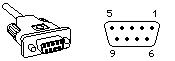 | |
| The serial plug is based on a PIN9 SUB-D plug. 5 Pins out of 9 have the following function: | |
|
You might also be interested in

Which PC connection do I have? USB, PS / 2 for desktop, mobile phone, laptop
A small interface guide for the correct connection of computer peripherals.
Details →
Lexicon from A-Z | Technical terms for computer peripherals
Hardware components, mainboard, CPU, processor, display, RAM, cables and fans, housing.
Details →